
Connect your first AI client in about five minutes. Questions? Contact support.
Requirements
- WordPress 6.0 or newer, WooCommerce 7.0 or newer, PHP 7.4 or newer. Tested with WordPress 7.1 and WooCommerce 11.3.
- HTTPS on your site. API keys travel in request headers, which must be encrypted.
- An AI client that supports MCP over HTTP, such as Claude Desktop, Claude Code, Cursor or VS Code.
Install
- Download
woocommerce-mcp-server-1.1.0.zipfrom this site (free) or from Account → Downloads (Pro). - In WordPress, go to Plugins → Add New Plugin → Upload Plugin, choose the ZIP, click Install Now, then Activate.
- Open WooCommerce → MCP Server.
The free and Pro editions are the same plugin. A Pro license key unlocks the write tools.
Activate Pro
- On this site, open Account → Licenses and click Show license key.
- In WordPress, go to WooCommerce → MCP Server Pro License, paste the key and click Activate / replace key.
The Connect tab then shows Pro is active. Each website domain uses one activation; move a license with Deactivate this website, or Deactivate in Account → Licenses. If the license expires, the server keeps working in read-only mode.
Create an API key
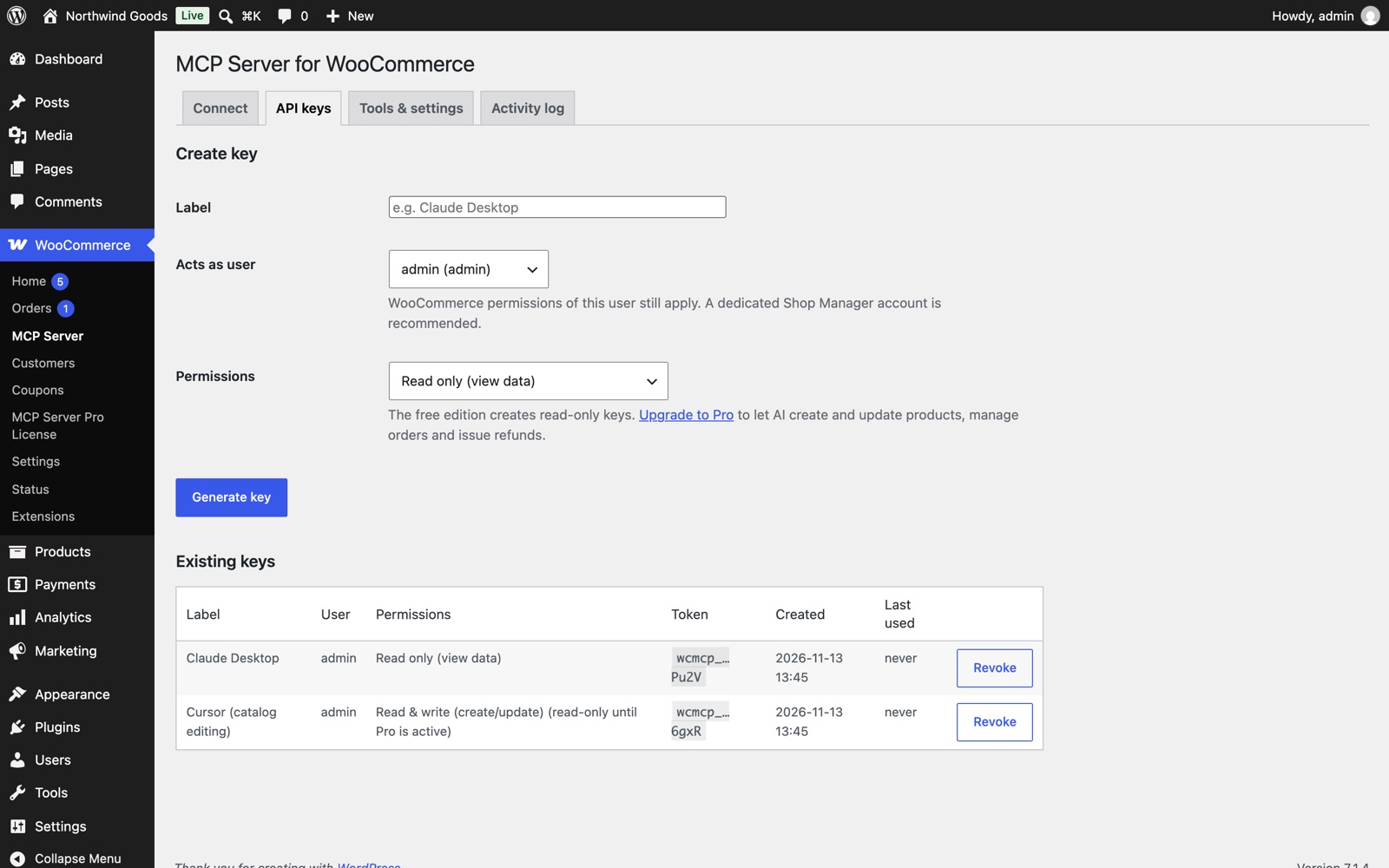
Go to WooCommerce → MCP Server → API keys.
| Field | What to choose |
|---|---|
| Label | A name you'll recognise, such as "Claude Desktop". |
| Acts as user | The WordPress user whose permissions apply. A dedicated Shop Manager account is safest. Only site administrators can pick someone other than themselves. |
| Permissions | Read only (free and Pro), Read & write (Pro: create and update), or Full access (Pro: also delete and refund). |
Click Generate key and copy it straight away. It's shown once; only a secure hash is stored. Revoke a key any time with Revoke.
Connect your AI client
The Connect tab shows your server address, https://yourstore.com/wp-json/wcmcp/v1/mcp, and ready-made setup for each client. Replace YOUR_TOKEN with your key.
Claude Code
claude mcp add --transport http woocommerce https://yourstore.com/wp-json/wcmcp/v1/mcp --header "Authorization: Bearer YOUR_TOKEN"
Cursor, VS Code and other clients that support headers
{
  "mcpServers": {
    "woocommerce": {
      "url": "https://yourstore.com/wp-json/wcmcp/v1/mcp",
      "headers": { "Authorization": "Bearer YOUR_TOKEN" }
    }
  }
}
Claude Desktop uses the mcp-remote bridge; copy its configuration from the Connect tab into claude_desktop_config.json and restart Claude Desktop.
Clients that only accept a URL (for example web-based connectors): an administrator can turn on Allow token in URL under Tools & settings. The Connect tab then shows a URL containing the key. URLs can end up in server logs, so use a read-only key for this and revoke it if it's ever shared.
Then ask your assistant: "Use the WooCommerce tools to give me a store briefing."
Tools
Tools the key can't use are hidden from the AI, so a read-only key only sees read tools.
| Area | Free (read) | Pro (write) | Pro (full access) |
|---|---|---|---|
| Store | get_store_info, get_system_status | ||
| Products | list_products, get_product, list_product_variations, list_product_categories, get_product_category, list_product_tags, get_product_tag, get_low_stock_products | create_product, update_product, batch_products (up to 100), update_stock, create_product_variation, update_product_variation, create_product_category, update_product_category, create_product_tag, update_product_tag | delete_product, delete_product_variation, delete_product_category, delete_product_tag |
| Orders | list_orders, get_order, list_order_notes, list_order_refunds | create_order, update_order, update_order_status, add_order_note | delete_order, create_order_refund |
| Customers | list_customers, get_customer | create_customer, update_customer | delete_customer |
| Coupons | list_coupons, get_coupon | create_coupon, update_coupon | delete_coupon |
| Reviews | list_product_reviews, get_product_review | update_product_review | delete_product_review |
| Settings | list_settings_groups, get_settings, list_payment_gateways, list_shipping_zones, list_tax_rates, get_tax_rate | update_setting, update_payment_gateway, update_shipping_method, create_tax_rate, update_tax_rate | delete_tax_rate |
| Reports | get_store_overview |
The server also offers three ready-made prompts: daily store briefing, order triage and low stock report.
Advanced: raw WooCommerce REST tool (Pro)
An administrator can enable wc_api_request under Tools & settings. It calls any /wc/ REST endpoint, for example product attributes or webhooks. GET requests need read access and other requests need write access. Deletes, batch deletes, refunds and WooCommerce maintenance tools always need full access.
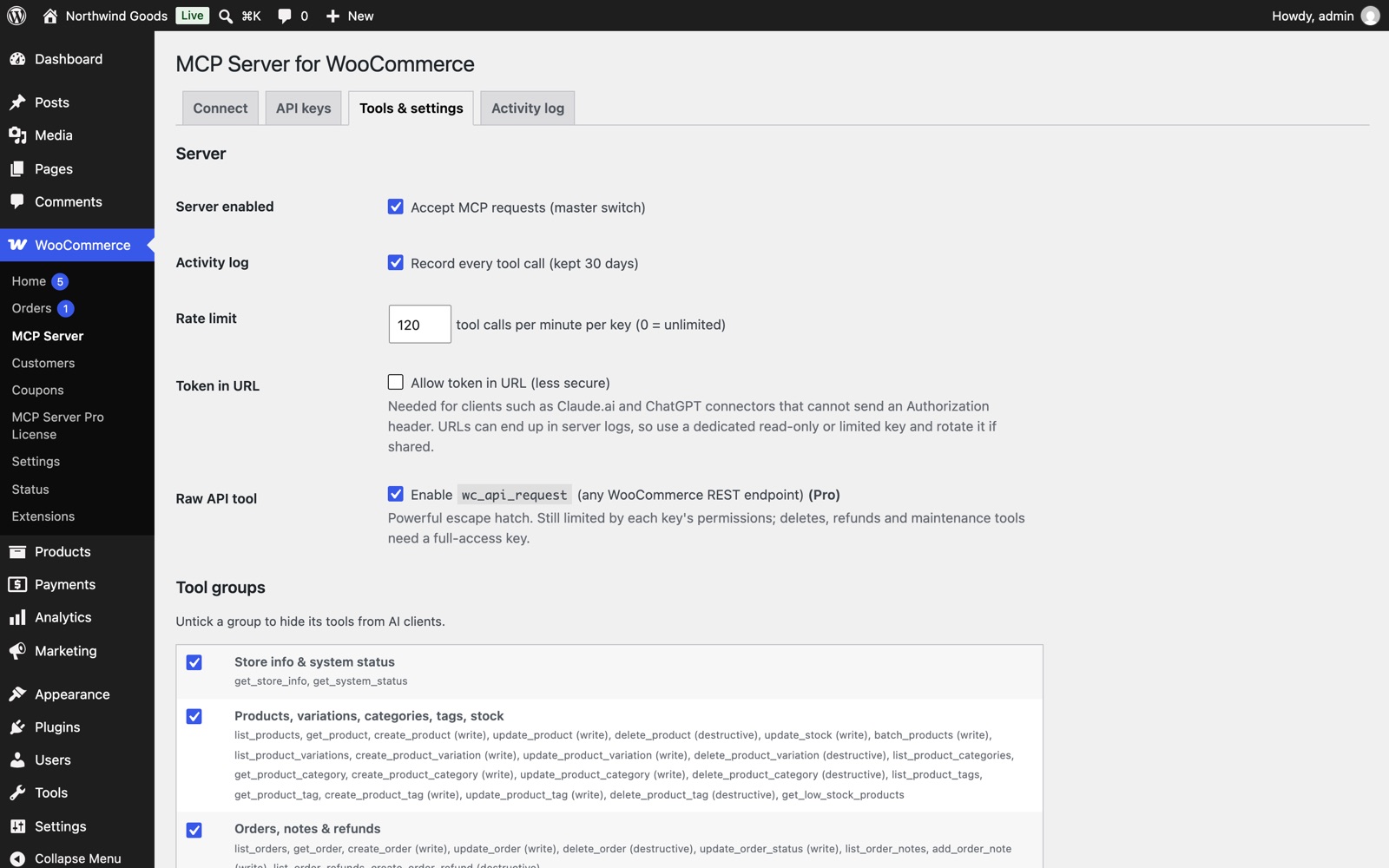
Tools & settings
| Setting | What it does |
|---|---|
| Server enabled | Master switch for all MCP requests. |
| Activity log | Records every tool call for 30 days. |
| Rate limit | Tool calls per minute per key (default 120; 0 means unlimited). |
| Token in URL | For clients that can't send headers. Less secure. |
| Raw API tool | Enables wc_api_request (Pro). |
| Tool groups | Untick a group (for example Customers) to hide its tools from every key. |
Only site administrators can save these settings.
Activity log
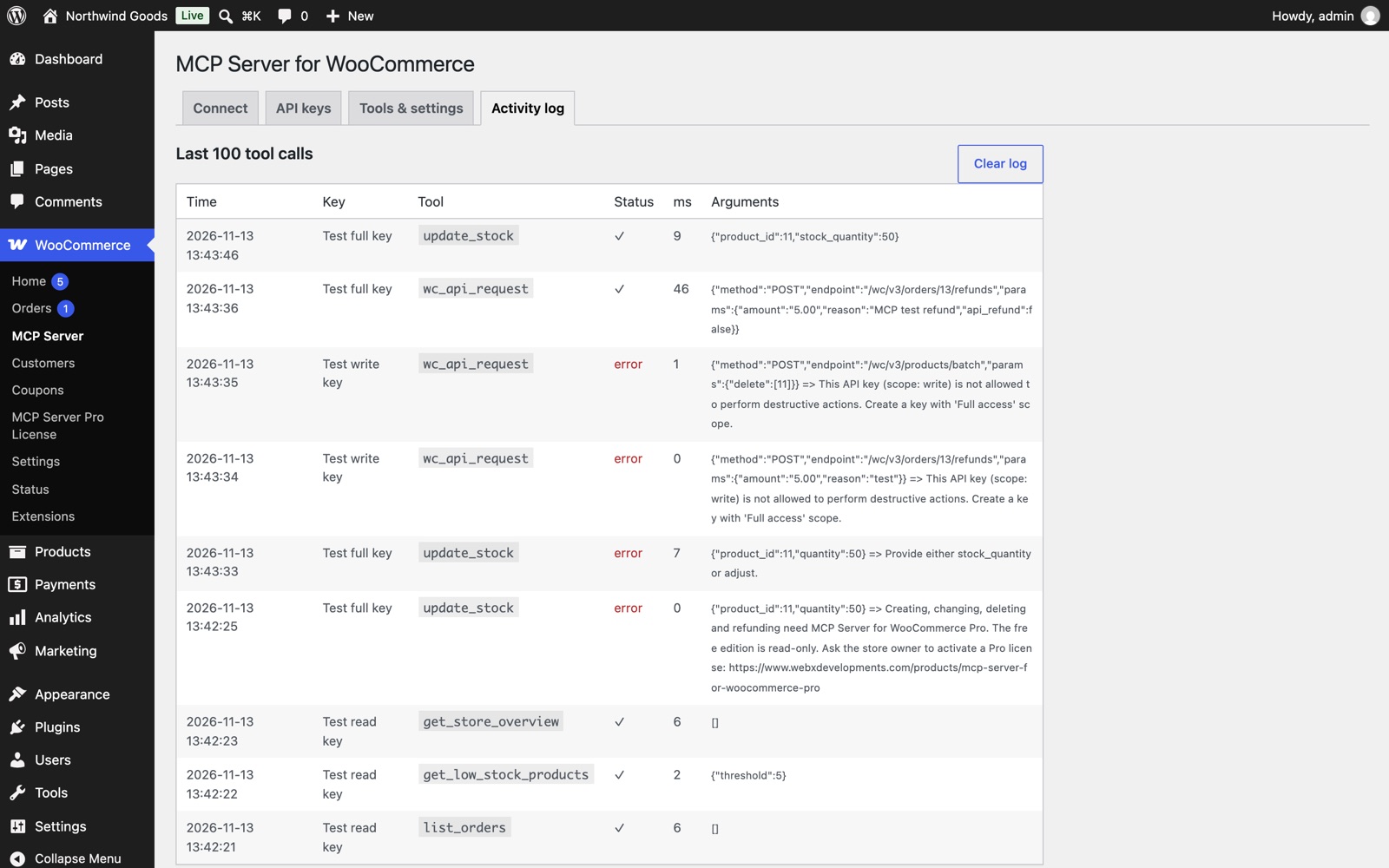
Activity log lists the last 100 tool calls with time, key, tool, result, duration and arguments. Failed calls show why, for example a key without permission. Entries older than 30 days are removed automatically.
Security checklist
- Use HTTPS.
- Start with a read-only key; give write or full access only to clients you trust.
- Use a dedicated Shop Manager account for "Acts as user".
- Keep Token in URL off unless you need it.
- Review the activity log, and revoke keys you no longer use.
Troubleshooting
401 Unauthorized on Apache or CGI hosting. The host removes the Authorization header. Add this above the WordPress block in .htaccess, or send the key in an X-MCP-Token header:
SetEnvIf Authorization "(.*)" HTTP_AUTHORIZATION=$1
403 "lacks WooCommerce permissions". The user the key acts as no longer exists or can't manage WooCommerce. Create a new key.
"need MCP Server for WooCommerce Pro". The key tried to change something on the free edition, or the Pro license has expired. Activate or renew Pro.
"is not allowed to perform destructive actions". Deleting and refunding need a full-access key.
"Rate limit reached". Wait a minute, or raise the limit in Tools & settings.
For developers
Add your own tools with the wcmcp_tools filter. Each tool has a name, group, access level (read, write or destructive), title, description, JSON schema and callback. The callback runs as the key's user, and its result is returned to the AI as JSON.
The endpoint implements MCP Streamable HTTP (stateless JSON responses) with protocol versions 2024-11-05, 2025-03-26 and 2025-06-18, including initialize, ping, tools/list, tools/call, prompts/list and prompts/get.
Changelog
1.1.0
- Free read-only edition and Pro edition unlocked by a license key.
- AI clients see only the tools their key can use.
- Security: only site administrators can create keys acting as another user or change server settings.
- Security: the raw REST tool needs full access for deletes, refunds and maintenance tools.
- Tested with WordPress 7.1 and WooCommerce 11.3.
1.0.0
- Initial release.